Case study Brand / Events and training
Global Beauty Verse
A beauty-industry event and training website connecting women’s skill development, event archives, community, and enquiries.
Problem statement
Give a beauty-industry training and events platform a clear public identity, with credible community context and accessible paths into its activities.
Proof / A quick look
See the product before the detail.
01 / Overview
The brief.
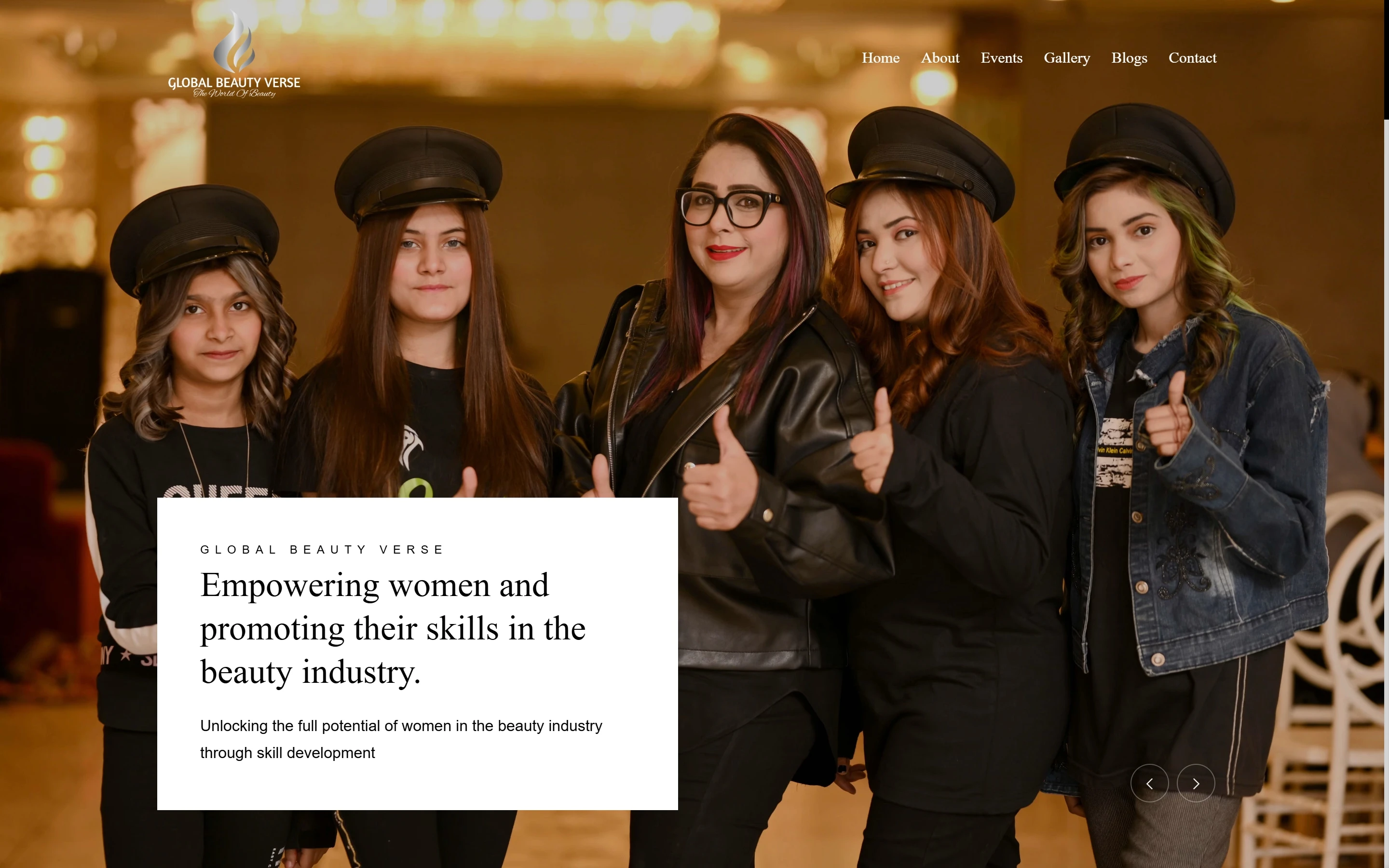
I designed and built the Global Beauty Verse website end to end. The public experience introduces a beauty-industry platform centred on inclusivity, women’s skills, workshops, demonstrations, master classes, and professional networking. It brings the organisation’s mission, founder profile, past training sessions, event stories, gallery, and contact routes into one branded website.
The challenge was to make the purpose immediately clear while giving prospective participants a way to explore the people and events behind it. Mission-led copy and imagery establish the first impression; event archives, a founder introduction, and a promotional video provide a more concrete picture of the community.
02 / Situation
What was already true.
The organisation brings beauty professionals and learners together through workshops, demonstrations, master classes, and events. The website has to explain that purpose to a newcomer while making its past activities, founder, media, and contact information easy to explore.
03 / Tension
The competing needs.
A mission-led introduction creates a strong first impression, but visitors also need practical evidence of what the organisation does. Event material spans different years, so the archive needs a recognisable structure alongside the main brand story.
04 / Decision
The choice that set the shape.
Build the journey around the mission, then move into the people and activities behind it. Keep About, Events, Gallery, Blogs, and Contact as distinct destinations, with past training sessions and event stories linking into their own context.
05 / Responsibilities
What I designed and built.
My scope covers the complete website design and implementation: responsive layouts, the homepage narrative and carousel, organisation and founder presentation, event and gallery entry points, archive navigation, media placement, and newsletter/contact entry points. The visual hierarchy connects the platform’s purpose to the next section a visitor can explore.
06 / Architecture
The implementation behind the interface.
The browser layer uses HTML, CSS, JavaScript, Bootstrap, and jQuery 3.6. Shared navigation connects the public page families. The homepage combines a hero carousel, about section, training-session archive, founder profile, event video, blog highlights, and newsletter entry. Year-specific event stories give historical content a durable destination, while the promotional video has its own explicit viewing link.
07 / System
How the pieces fit.
A first-time visitor reads the purpose, learns about the platform, and inspects a past training session or event. The founder and media sections add human context. About, Events, Gallery, and Blogs support deeper exploration, while Contact and newsletter entry provide ways to continue the relationship.
08 / Evidence
What the shipped interface can show.
The live website exposes the mission-led carousel, workshop and training introduction, past session links, Shaziya Khan’s founder profile, event-blog archives, a Vimeo promotional video, and the newsletter/contact entry points. The pages give the brand story and its activity archive a common navigation structure.
09 / Next iteration
The next question.
Make upcoming and historical activity even easier to distinguish, and review the route from a particular training format to an enquiry. Maintain useful event titles and archive labels as the organisation adds new material.
10 / Feature list
Features.
- Mission-led homepage and carousel
- Workshops and professional training introduction
- Year-specific training and event archives
- Founder profile
- Gallery and blog navigation
- Event promotional video
- Newsletter and contact entry points
- Responsive Bootstrap and jQuery interface
Gallery
Project images.
Open an image to view it. The full-image link still works when scripts are unavailable.